PREVIEW
Take a spreadsheet
Select a range
It becomes a widget
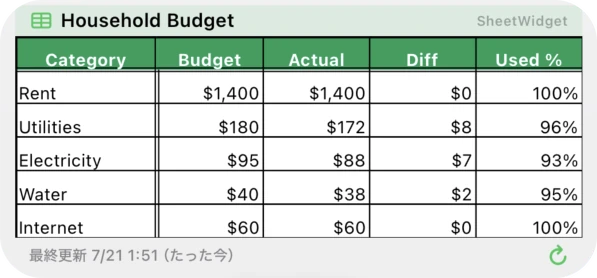
scroll
Your Google Sheets, on your Home Screen.
That spreadsheet you check ten times a day — put it on your Home Screen and just glance. Borders and colors intact, always up to date.
PREVIEW
FEATURES
Core features are free forever. Try Pro free for 7 days.
PRIVACY BY DESIGN
Sheet Widget is a standalone app with no backend. Credentials live only in your iPhone’s Keychain, and your sheet data is never sent to us or anyone else. No ads, no tracking.
Google Sheets
your iPhone
FAQ
No. Just pick the range you want to show — the sheet stays private. Nothing is ever made visible to anyone else.
Sheet Widget can only read the sheet you explicitly selected. It never handles your password directly — access is scoped through Google’s own OAuth sign-in.
If you just want one table on your Home Screen, Free covers it. Want multiple sheets, no watermark, charts, or copying a cell’s value? Go Pro — it’s free to try for 7 days.
On iOS, automatic refreshes happen roughly every 15–60 minutes. Need it now? Pro’s instant refresh button updates it right away.
Yes — computed results and images show up as-is. You don’t need to rewrite formulas or set up any script for the widget.
Values, background/text colors, bold/italic/underline/strikethrough, borders, alignment, merged cells, and text wrapping are all reproduced. Some objects, like checkboxes, aren’t supported yet.
iOS does not allow a widget to write to the clipboard directly.
The app comes to the front for a moment to do the copy.
If you set the tap destination to “Spreadsheet”, you land on the sheet right after the copy.
No, only the cell’s text value is copied.
Text color, background color, bold, and other formatting aren’t copied, and neither are images shown via the IMAGE function.
Tapping an empty cell copies nothing.
Free to use — and Pro comes with a 7-day free trial.